Elevation badges on every listing
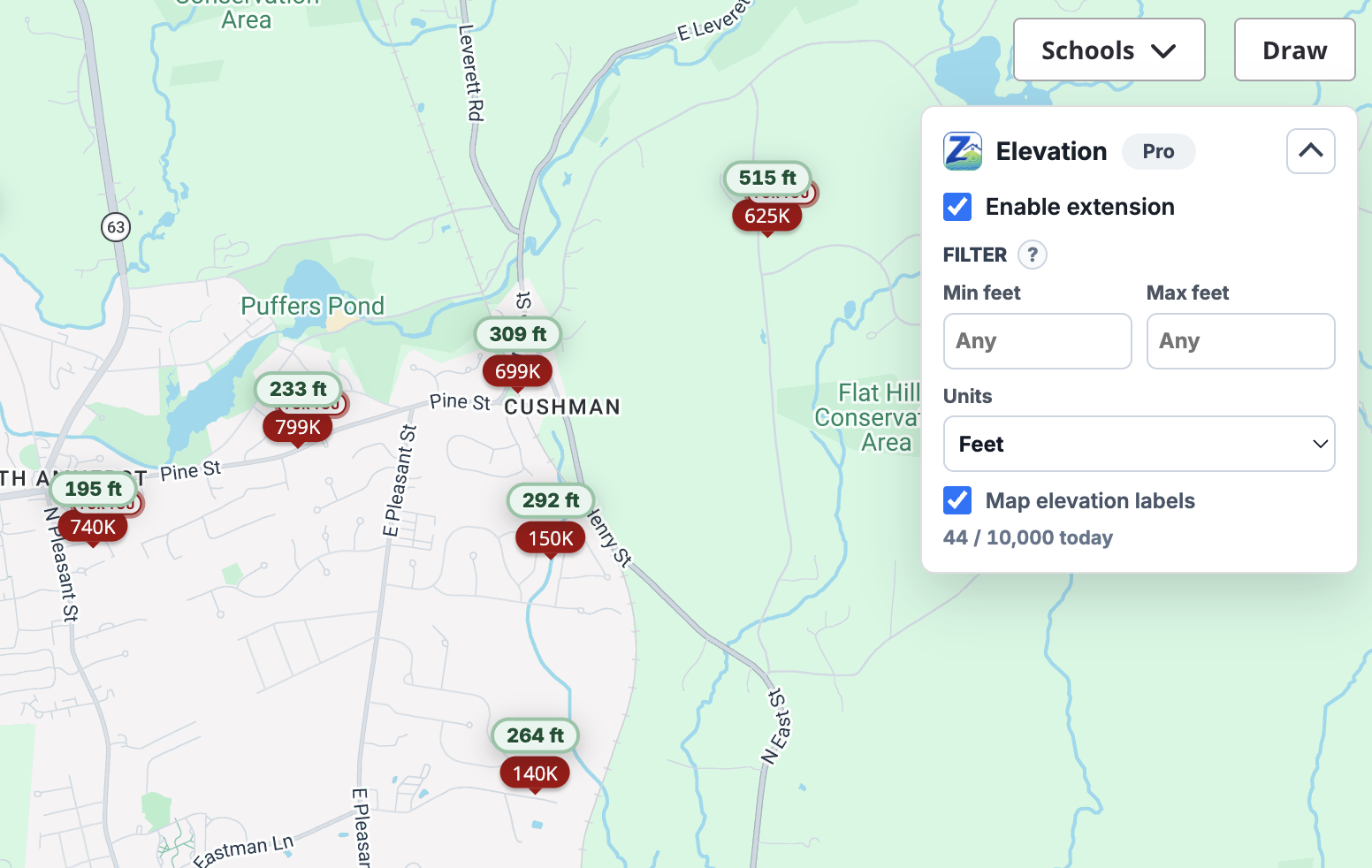
A small badge appears on each visible Zillow listing card with the approximate elevation in feet or meters.
Zillow Elevation Tool adds approximate elevation badges to visible Zillow listings and labels matched map pins, so you can spot hillside, valley, and waterfront properties at a glance. Pro adds filter controls that auto-hide listings outside your elevation range.
No new tabs, no copy-pasting coordinates into a separate map. Open Zillow, scroll, see elevation. It's that simple.
A small badge appears on each visible Zillow listing card with the approximate elevation in feet or meters.
When the listing is uniquely identifiable on the map, the price pin gets an elevation label too — so you can browse the map view with terrain context.
Set a min and max elevation. Pro auto-hides listings outside your range, keeping pending lookups visible while data resolves.
Resolved elevations are cached on your device so revisited listings don't burn through your daily lookup quota.
Integrates with multiple public elevation data sources for excellent coverage across the country, with graceful fallbacks when one is unavailable.
Runs only on Zillow tabs you open. No tracking pixels, no ad networks, no resale of listing data.
Add Zillow Elevation Tool from the Chrome Web Store. Pin it to your toolbar so the popup is one click away.
Open any Zillow search or listing page. Elevation badges appear on visible cards as you scroll.
Open the popup, set a min and max elevation, and listings outside your range get hidden automatically.
Payments are processed securely by Stripe through ExtensionPay. Cancel any time.
$0 forever
$6.99 /month
$49.99 /year
Need to upgrade or cancel later? Open the extension popup and use the Pro management link. Pro status is verified through ExtensionPay.
Practical guides on elevation, flood risk, and getting more signal out of every Zillow search.
Two homes a block apart can sit on radically different flood exposure profiles. Elevation is one of the cheapest, fastest signals you can pull before you ever schedule a tour — and it's one most buyers skip.
Flood riskFlood zones describe risk categories drawn at neighborhood scale. Elevation is a single point measurement. Knowing the difference changes how you read both.
Available on the Chrome Web Store. Works on any Chromium browser that supports Manifest V3 extensions.
Elevation values are estimates derived from public elevation data. They are not survey, engineering, safety, legal, insurance, or flood-risk determinations. Atlas Software and Zillow Elevation Tool are independent and are not affiliated with Zillow Group.
Elevation is sampled from public terrain data (AWS Terrarium tiles with USGS EPQS fallback) at the listing's coordinates. Expect typical accuracy within a few meters in well-mapped areas. Use it for relative comparisons between listings, not for survey-grade decisions.
It works on Zillow search results, map view, and individual listing detail pages. Listings without coordinates available in the page or map data show a "coordinates unavailable" state — they are not geocoded by default to keep your daily lookup quota meaningful.
A "lookup" is a new elevation request the extension hasn't cached yet. Cached results don't count, so revisiting the same listing is free. Quotas reset by UTC date.
No. The extension only runs on Zillow tabs you open, only sends coordinates to public elevation providers to fetch elevation values, and stores cache and settings locally in Chrome extension storage. See the privacy policy for details.
Open the extension popup and use the Pro management link. Cancellation prevents future renewal. For refund questions, email tobrien6@gmail.com.
For support, billing, refunds, cancellation help, or privacy questions, email tobrien6@gmail.com. Please include your browser, a short description of the issue, and whether the request is about Free or Pro access.